User Guide
These tools allow natural language querying and analysis through AI Agents. They simplify access to and interpretation of phenological information collected by the USA-NPN.
You can get started quickly by following the Getting Started below.
More detail about the Agent, Client, and MCP Server architecture are also provided below as well as examples of using the MCP Server to access and analyze phenological data.
Getting Started
Prerequisites
Host: Recommended is Claude Desktop App but any AI Agent (IDE, AI Tool etc) that supports the Model Context Protocol (MCP) can be used as a Host.
- Install MCP Server: Refer to the README.md in the GitHub repository for instructions on installing the MCP Server.
- Configure Server with MCP Host: Configuration with Claude Desktop App is also found in the README.md but this Server can be configured with any MCP-compliant host (like this Copilot MCP Extension in VSCode).
- Launch Host: You are ready to use the MCP Server in the host application. See below.
Example Usage

This example includes:
- Basic Queries: Natural language queries for retrieving phenological data.
- Mapping: Generating map of the retrieved data.
Learn More: AI and MCP Servers
Large Language Models (LLMs) such as OpenAI's GPT models, Google's Gemini models, Anthropic's Claude models and Meta's (open-source) Llama models have proven powerful in reasoning and generalize well across language and text-based tasks. AI Agents result from connecting powerful models to tools, allowing them to interact with the world. Adding NPN data query and analysis to the Agent's toolkit is a major goal of this project.
Recently, interaction between AI Agents and their underlying tools was pushed towards standardization with Model Context Protocol (MCP), a structured Client-Server communication protocol. This is a push towards "cross-platform" compatibility where LLM-hosting applications can connect to custom MCP Servers that provide agency for action.
The custom MCP Server presented here can add USA-NPN Data interaction and analysis to the Agent's repertoire by communicating with MCP Clients in MCP-compatible Hosts (like Claude Desktop, IDEs or AI Tools).
There are many other awesome MCP Servers for making capable AI Agents.
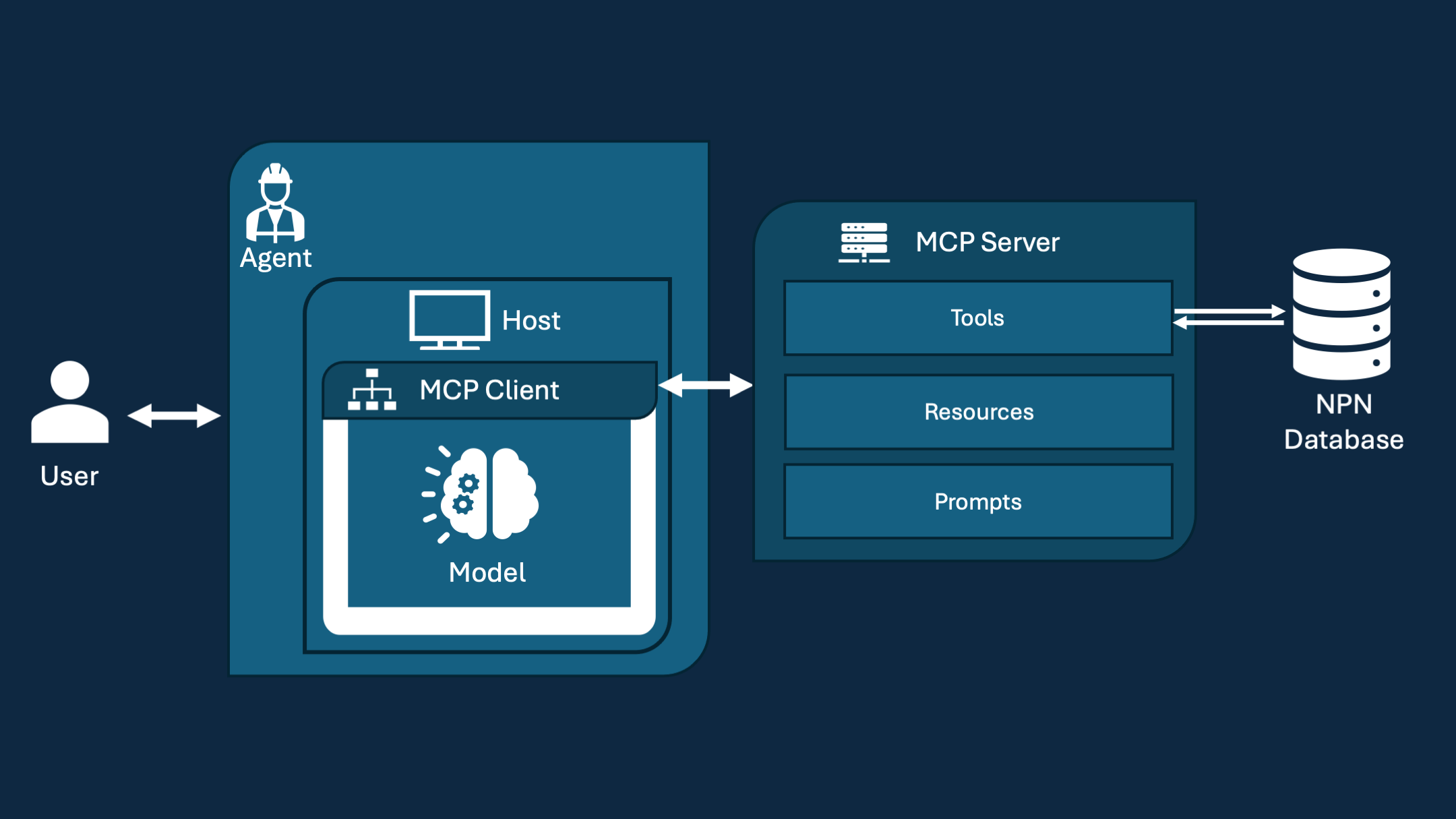
Agentic Systems and Model Content Protocol (MCP)
| Symbol | Term | Description |
|---|---|---|
 |
LLM | A Large Language Model, such as Claude 3.5 Sonnet or GPT-4o, that can "understand" and generate text. These models are often pre-trained to perform well on a diversity of tasks. A model serves as the core AI "brain" for reasoning, natural language processing, and conversation. |
 |
Host | An overarching application client that users interact with — such as a chat assistant (e.g., Claude Desktop) or an IDE-integrated tool. It manages workflows and connects to MCP Servers using MCP Clients. These often come with custom tooling like chatting or resource-attach integration. |
 |
MCP Client | Embedded within the Host, the MCP Client establishes and maintains a connection with MCP Servers through the Model Context Protocol (MCP), translating tool requests into protocol messages and managing stateful connections. |
 |
MCP Server | A lightweight server that runs locally and exposes specific capabilities to the MCP Client through MCP. The USA-NPN MCP Server described here provides Tools, Resources, and Prompts for orchestrating tasks like NPN API calls, data visualization, and phenology workflows. |
 |
Agent | An entity empowered with an LLM for reasoning, decision-making, and language processing that is capable of tool use and orchestration (deciding when to use a tool). It performs tasks using connected tools and resources, managing multi-step interactions and complex workflows. |
Using these terms in a few sentences:
The Claude AI Agent is empowered with various LLMs such as Claude 3.7 Sonnet trained by Anthropic. Using the Host (sometimes Client or Application) named Claude Desktop, you can chat with this Agent because it contains tools for conversation. Claude Desktop is an MCP Host because of its MCP Client capable of connecting to any MCP Servers. One interesting MCP Server is the NPN MCP Server for phenological data analysis.
MCP Tools, Resources, and Prompts
Tools, Resources and Prompts are some of the structured ways that MCP Servers can expose their capabilities to the Client. Tools allow interaction and function calling, resources provide data/file handling, and prompts are templates for workflows and interactions with Agents.
- Tools: Data retrieval and summarization, visualization, other analysis.
- Resources: Access to queried phenological data and structured summaries of literature.
- Prompts: Predefined templates for interacting with AI Agents in phenology.